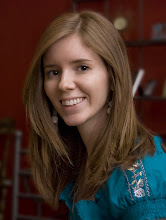
Let's try this again!

I know, I know....Summer was incredibly hectic so I didn't actually write like I said I would. OOPS! I'll have a little more free time coming up soon so I hopefully will have a chance to post more. Just a couple of updates: We're thinking about moving. There...I said it. I really miss living in the city, so if we actually decide to sell our house, hopefully we'll be moving into a new apartment complex in Goldsboro (it's SOOOOO nice). I've also joined a roller derby team. Shocked? Yeah, me too. But it's so much fun. I haven't gone out there and knocked anyone around yet, but the time is coming! I highly recommend it to anyone who's ever thought about trying it. By the way, I've been trying to come up with a derby name and I think I've decided on "The Ginger Revenger." Kind of catchy I think. I'll have to make sure to get some photos from practice to share with you guys.

This isn't going to be a very long post, but I did want to share some of my recent work with you all. Here's a photo restoration I did yesterday. To see more photos, you can go to http://jophoto_design.carbonmade.com

Read more...

Apparently I took a break

Despite all the evidence that points to the contrary, I did not fall off the face of the earth. It's been an incredibly busy summer and I just haven't been able to find time to sit down and type about it. Just to give you a run down of what we've been up to:


1---Jeremy quit his job and is going back to teaching music...WOOHOO!

2---Rearranging rooms in the house and doing some redecorating. It's turning out really well...at least I think so. There's no longer a dining room table in the dining room. Since it had gone unused for a year and a half, I figured that we probably weren't going to be using it any time soon. Sooooo, it's been transformed into my new office/art studio. LOVE IT! Can't wait to post photos. It's really getting a lot more use now. Jeremy was supposed to be turning the old office into his personal music studio, but he won't get out of MY office, so little has been done in his. Also got some new accessories for the living room, which it desperately needed.

3---I've been working on some paintings. My latest (and one of the best) is a pop art style Michael Jackson painting. I was a HUGE fan and I thought that my art studio would look more "artsy" with some actual art in it. Photos of it are coming soon as well. My next project is an Elvis painting, but I've got to find a photo of him that suits the room.

4---Since Jeremy has been playing "stay at home hubby" for a bit, my yard has gotten some much needed maintenance. It was looking pretty bad. Now we just need some plants for the porch and we'll be done! (with the front yard at least)
Anyway, like I said, there's a ton of things that I really need to post. I'll really make an effort to do so in the near future. I've been kind of Blogger deprived for a while. Looking forward to catching up :)

Read more...

Fix-It Friday #18


Yet another edition of Fix-It Friday :) I love doing these, because it means the weekend is here! WOOOOHOOOO!!!! I have to shoot a wedding tomorrow, but hey....it's still the weekend! Anyway, onto the edits:

ORIGINAL


SEPIA

This first one is just a simple sepia. For those of you who don't know, I'm not a big fan of actions. Kind of like cheating to me, but to each his own. Personally, they're just not for me. I'm going to try to do little better with details of process.
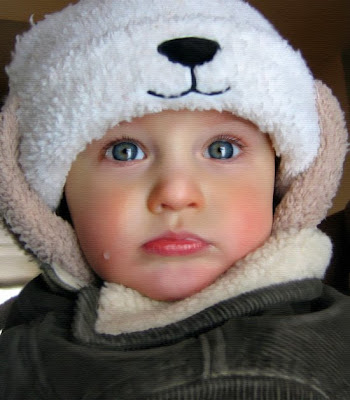
1. Opened in Photoshop CS 3 and cropped
2. Changed the mode to Grayscale.
3. Did a levels adjustment to bring up the contrast without blowing out the whites of the image.
4. Used the patch tool to smooth out his skin
5. Used the paint brush (white) with a setting of 5% to brighten the eyes.
6. Increased the paintbrush size and created highlights on the tip of the nose, on the lips, cheeks, and chin.
7. Used the unsharp mask to...well, sharpen
8. Did another unsharp mask with numbers set at 15, 85, and 3 to clarify the image.
9. Did a sepia photo filter and bumped up the intensity. (by the way, you have to change the mode to RGB or CMYK to access the photo filters)
10. Added a inner shadow to focus the image on the face.

DIGITAL PAINTING

I know I said I was going to do a tutorial on digital paintings....but I've been busy (lazy). I still plan on doing a much more in depth one, but I will improve a little bit now.
1. Open image and crop
2. Increase saturation slightly
3. Surface Blur (not too much, preserve detail)
4. Use the smudge tool to soften the lines and details of the photo, especially in the background and edges.
5. Use the paintbrush tool (white) with a setting of 5% to create highlights over the entire image. A good background in art helps here. Focus on where the light naturally hits or where the cloth would be a little more worn such as the edges of the coat, the bridge and tip of the nose, lips, the rim of the hat, etc.
6. Select some of the colors from the image to highlight those areas. For instance, use the eyedropper to pull color from his eyes, make the color more intense, and then at it subtly to make the eyes pop.
7. Do the clarifying unsharp mask from the previous picture.
8. Use the Texturizer from the filter menu to add a canvas like look to the image. Looks a little grainy on screen but prints great.

BLACK & WHITE

Did I mention I was lazy? All I did for this one was take the digital painting before I added the texture and change the mode to grayscale. Then I just adjusted the levels to add contrast. Simple enough.

Have a great weekend everyone and be safe! RIP Ed McMahon, Farrrah Fawcett, and Michael Jackson.

Read more...

I'm feeling creative

Ok, I feel pretty creative on a regular basis. It would be pretty bad if I wasn't considering I'm a graphic designer. However, I'm looking for a completely different kind of creative outlet. Jealous cannot begin to describe my feelings toward people who have a talent for sewing and creating things with fabric.

My sewing skills are basic (at best!). I've made ATTEMPTS at sewing. A few years ago, I made little handbags, but you'll never see them because I'm embarrassed by the end result. Overcoming my past failures, I'm hoping to make another attempt to break into the sewing world. I've already bought fabric from eBay (basically because all the fabric stores around here are terrible). Then I realized, I'm going to need a sewing machine. I plan on making that purchase this week.

I'm not really sure what I'm going to do with all this fabric. I know I want to make some camera straps, (thanks to the tutorial demonstration found here) but I'm not sure what to do with the rest. I'm open to suggestions. Here are the photos of the 16 different types of fabrics (warning, envy might ensue):
Yeah, I'm in love with these Amy Butler fabrics...and I haven't even gotten them in the mail yet. I'm sure I'll be buying many MANY more. In fact, I'm checking eBay at this very moment. Now, I just need to find time to do all this creative stuff :/

Read more...

"Pepper: Spice up your camera" Giveaway!


love Love LOVE these camera straps. Lori Nordstrom's company is giving away a free camera strap. Seriously, go check them out at this site. If you're disappointed, there's something wrong with you. Sorry, it had to be said.
Click the iHeartFaces site to enter the giveaway.

Read more...

My House

Ok, I'm posting these basically because I wanted to show everyone the "before" photos before I start making some major and minor changes to parts of my house. There's some rooms that have already been done and some will be finished in the VERY distant future. I just took photos from the "right wing" of the house. I guess I didn't feel like cleaning the left wing on the day these photos were taken. Some of the ones I've included for today are: the dining room I never use, the yard that will soon be a lush garden, my favorite room (kitchen), and the living room that needs an accessories overhaul. Keep in mind that my house is 108 years old. I think she carries it pretty well. Anyway, enjoy :)

Read more...

Albums, Albums everywhere...

Nothing much to talk about, just wanted to share some pages from the latest wedding album I designed. One down, 3 to go!

Read more...

  © Blogger template Shush by Ourblogtemplates.com 2009

Back to TOP